Visual prototyping - some examples
About these blog posts: I wrote these blog posts alongside revisiting my PhD, including parts that didn’t make it into the final thesis, in the run up to my Viva exam. Rather than preparing in a closed way, I wanted to use the process of rewriting my work for a different audience as a way of getting back close and personal with the ideas.
One thing that kept reappearing in the game making sessions was the use of visual forms of prototyping and sketching. Sometimes this involved paper, graph grids, or whiteboards. Sometimes it involved directly manipulating graphics in software. Sometimes it emerged through the structure of the code itself.
Looking back, I think these different forms of visual prototyping became important because they helped participants bridge the gap between imagining a game idea and making changes to a working game. They also created different ways for families to collaborate, plan, test, and communicate ideas together.
A technical note on grid-based prototyping
Chapter 5 of my thesis describes the use of a text-based grid within the starting game code template to help participants alter level design in an intuitive way.
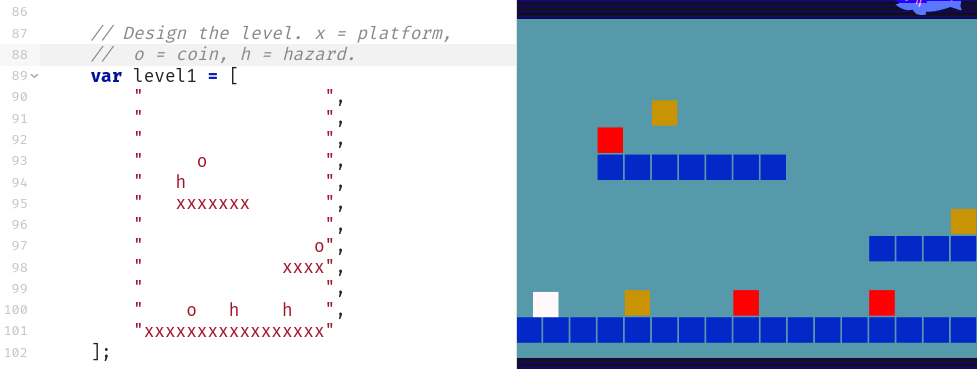
Each level is a JavaScript object consisting of a data array of 12 entries containing 17 characters which represent a matrix layout of the game. Each grid entry can be either black or one of the following: x (platform); h (hazard); o (coin). The structure of the text-based array has a strong visual correlation with the resulting game layout and changes to the text-based grid in the code area on the left would be immediately seen in the right-hand project preview area. This solution reduces the complexity and repetitive nature of asset placement, mirroring a technique called tilemaps 1 used in more graphical, non-text code game making tools.
An example interweaving code and paper design
In one case study a parent (Susanna) notices her child’s difficulty in using cursor and delete/backspace keys to edit a matrix allowing level design. The parent provides a book with grid paper to allow the child to replicate the matrix. The parent is then able to transcribe the design to the code example while engaging the child by checking she has interpreted the design correctly. The use of paper prototypes was one technique used by several parents to support their children to form and develop their design ideas.
This graphical matrix helped the child design with little coding or literacy ability. The parent uses the graphical representation of design in the code template as a jumping off point to make a connection to home practices of sketching things out on paper. When I was analysing the video data of this interaction I noted that the process of turning the sketch into reality on the screen and sharing it with others appeared to be transformative in terms of the engagement level of the child.
From paper sketching to digital sketching
There are other examples of paper prototyping of GDPs being used by parents to provide scaffolding for their children. When invited to share their design process in a post-session interview, Ed and Mark also discuss the use of paper to clarify initial GDP ideas. When asked about how they planned the game together, Mark explained:
Mick: Tell me a bit how you came up with those aims in your game, in terms of coming up with a plan.
Mark: What for the things that we need to do to it to finish it?
Mick: Yeah. Oh, just even from the beginning point. How did you plan together as well?
Mark: Well we started off on paper didn’t we. That's the first thing we did. I think it was a benefit actually. We, we did a lot of sketching didn’t we and a lot of brainstorming ideas and seeing and trying to test out whether it would work.
Later in the interaction, the parent outlines a different use of prototyping, that of sketching directly into software. On a software level, visual asset creation was supported through the use of block graphics and the external Piskel tool (see Figure below). Generic coloured blocks within the template encouraged participants to design and substitute their own graphics.
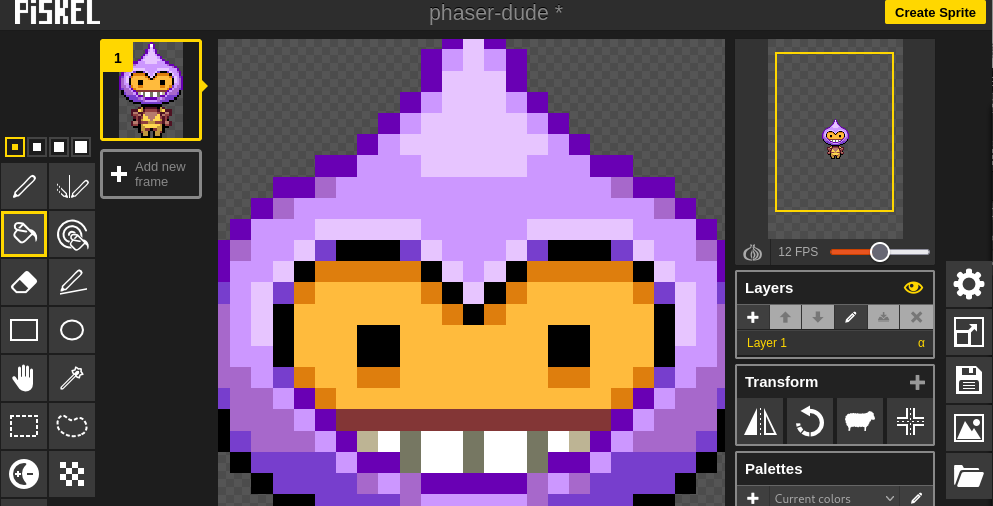
For this pair, the child appears to prefer sketching directly into software. The father also appreciates potential problems of translating ideas from paper into a digital format.
Mark: I was very excited by seeing Ed playing with this because it's interesting that everything doesn't have to be a paper and pen.
It's nice to just for the kids to feel that they can sketch on Piskel straight off the bat without taking a tutorial or being told by an adult. It's really intuitive and you just go straight into it.
Mick: That's an interesting thing because in some ways it started off with people working on paper because I thought that would be really accessible. Yeah. And maybe it was through observations of people just going “Do you know what I’m just happy sketching on Piskel”.
Mark: (Animatedly) The kids, all the kids I saw not just Ed.
Mick: Digital sketching.
Mark: Yeah.
Mick: It seemed to have value in that you were just doing it in the same format that you would use for the game.

Mark: Yeah. I think it's really important. I think the pencil and pen thing just didn't work did it. We sketched... It's got its place. But it's, the kids weren't that interested in using the graph paper to block out Piskel. It didn't translate. It was just easier to block it out straight in software.
Related posts
In truth, while these examples start to hint at both the usefulness and the flexibility of these visual prototyping techniques as a way of bringing participants into the process of game making, visual prototyping was not a central focus of the thesis argument. However, these kinds of interactions repeatedly appeared throughout the sessions and seem worth reflecting on more directly. They also align with existing research highlighting the value of visual approaches in novice multimedia programming 2.
These examples also connect to wider questions explored elsewhere in the project concerning accessibility, learner agency, and the different ways participants approached planning, sketching, and expressing ideas through game making. Related reflections on inclusive and flexible approaches to participation can be found in Inclusive design and neurodiversity, while broader discussions of learner choice and open-ended participation are explored in Reflection on Choice and Messy Learning and REEPPP.
Footnotes
-
This paper on Procedural Generation of 2D Levels for a Motion-based Platformer Game describes tilemaps https://liu.diva-portal.org/smash/get/diva2:1265466/FULLTEXT01.pdf ↩︎
-
see - Resnick, M. et al. (2009) ‘Scratch: programming for all’, Communications of the ACM, 52(11), p. 60. Available at: https://dl.acm.org/doi/pdf/10.1145/1592761.1592779 & Guzdial, M. (2004) ‘Programming environments for novices’, in S. Fincher and M. Petre (eds) Computer Science Education Research. Taylor & Francis. ↩︎